
A red speed score is a prompt to read three answers about real phone visitors: does the page show fast, does it hold still, & does the first tap work. Read those on the phone view before anyone quotes a rebuild.
What a red speed score is telling you
The red is where one of my clients got scared. They ran a PageSpeed test, saw a red number at the top of the page, and the next conversation they had was about a rebuild quote they didn’t need.
I understand the fear: speed matters to the people you’re trying to reach. Google tested the speed of 900,000 websites and found 53% of people would leave a site that took three seconds or more to load (Ahrefs). That’s about half the people who tapped your link, gone before they saw your name.
If you’ve already been handed a rebuild quote, I’ve broken down what a website should cost so you can weigh it against the test.
PageSpeed Insights, Google’s free speed test, reports how real people experience your page on phones and computers (Google), and the first answer to read is the moment your page shows on a phone.
How fast the page shows on a phone
That moment is called Largest Contentful Paint (LCP), the time until the biggest picture or block of text appears, and PageSpeed Insights rates it Good at 0-2500ms, Needs Improvement above 2500ms up to 4000ms, and Poor over 4000ms (Google).
That’s two and a half seconds for good and four seconds before it turns poor.
Someone on a phone in a parking lot is looking for your number or the one service they searched for. Four seconds of blank screen is long enough to tap back to the next shop on the list.
I read this tile first: it decides whether they ever see the rest of your page.
Once it shows, the question is whether it stays put.
Whether the page jumps while they read
Staying put sounds small until you’ve felt the opposite. You go to tap a link, a photo loads above it, the whole page slides down, and your thumb lands on something else.
The report scores that jump as Cumulative Layout Shift (CLS), how much the page moves as pictures and ads load, and rates it Good at 0-0.1, Needs Improvement above 0.1 up to 0.25, and Poor over 0.25 (Google).
PageSpeed Insights is one of the tools that measures this from real visits (Google).
A page that shifts under a customer’s thumb sends them to the wrong button or loses their place. It reads as a broken site, even when nothing on it is broken.
A page that shows fast and stays put still has to answer the first tap.
Whether the first tap works
That first tap is usually the call button or the menu. The report times the response as Interaction to Next Paint (INP), how long the page takes to visibly respond to a tap, another real-visitor measurement alongside the two above (Google).
PageSpeed Insights rates it Good at 0-200ms, Needs Improvement above 200ms up to 500ms, and Poor over 500ms (Google). That’s a fifth of a second for good and half a second before it turns poor.
On a slow page, a ready customer taps “Call,” nothing happens, they tap again, and in that pause they decide the site is broken.
I read this tile as the moment a visitor becomes a phone call, or doesn’t.
Your own report shows where each of the three sits.
Reading our own PageSpeed report on the phone view
I ran ours through PageSpeed Insights with the Mobile tab open first, because the phone is where that parking-lot customer is.
The top section, the one to read, covers real visits over the previous 28-day period: the page-showing, jumping, and tapping measurements plus one more (Google), drawn from Chrome’s anonymized records (Google).
Each tile shows the 75th percentile of page loads, split between phones and computers (Google). That’s the visit three out of four people beat, so the tile describes your slower visitors.
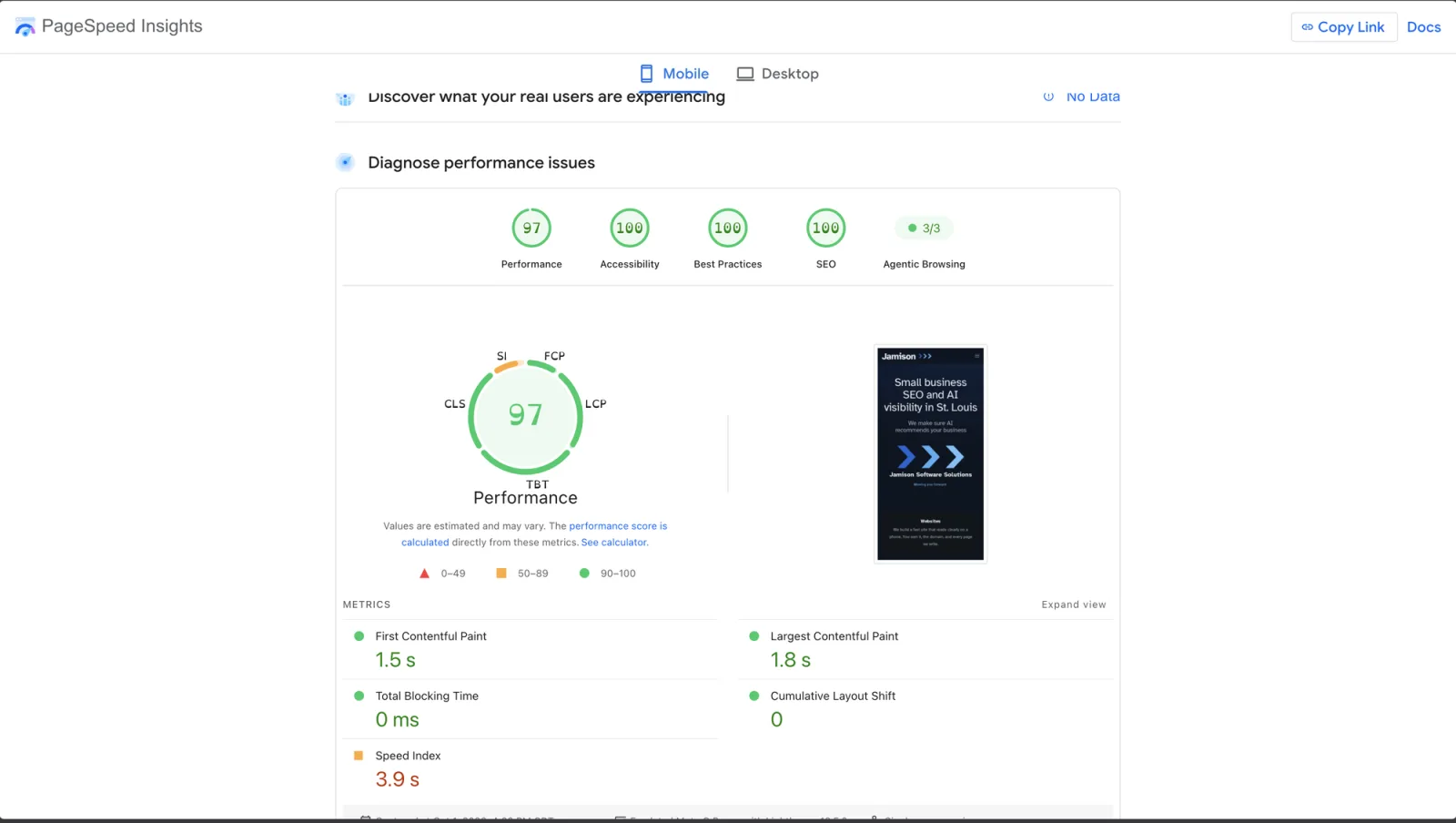
Our own PageSpeed Insights run on the Mobile tab, captured Oct 1. The real-user block reads No Data; the lab run below is what is left to read. Screenshot: Jamison Software Solutions.
Our real-user block reads No Data. Google hasn’t collected enough visits to our site to fill the tiles yet, and that is how most small-business sites look. When that happens, the lab run below is the read, and I’d run it twice: ours moved between 99 and 97 an hour apart.
Lower down sits the big round performance score, the number that tends to scare people. PageSpeed Insights says that lab number comes from a controlled test, useful for debugging but able to miss real-world slow spots, while the tiles up top capture the real-world experience (Google). The same page says a good lab score doesn’t guarantee a good experience for real visitors (Google).
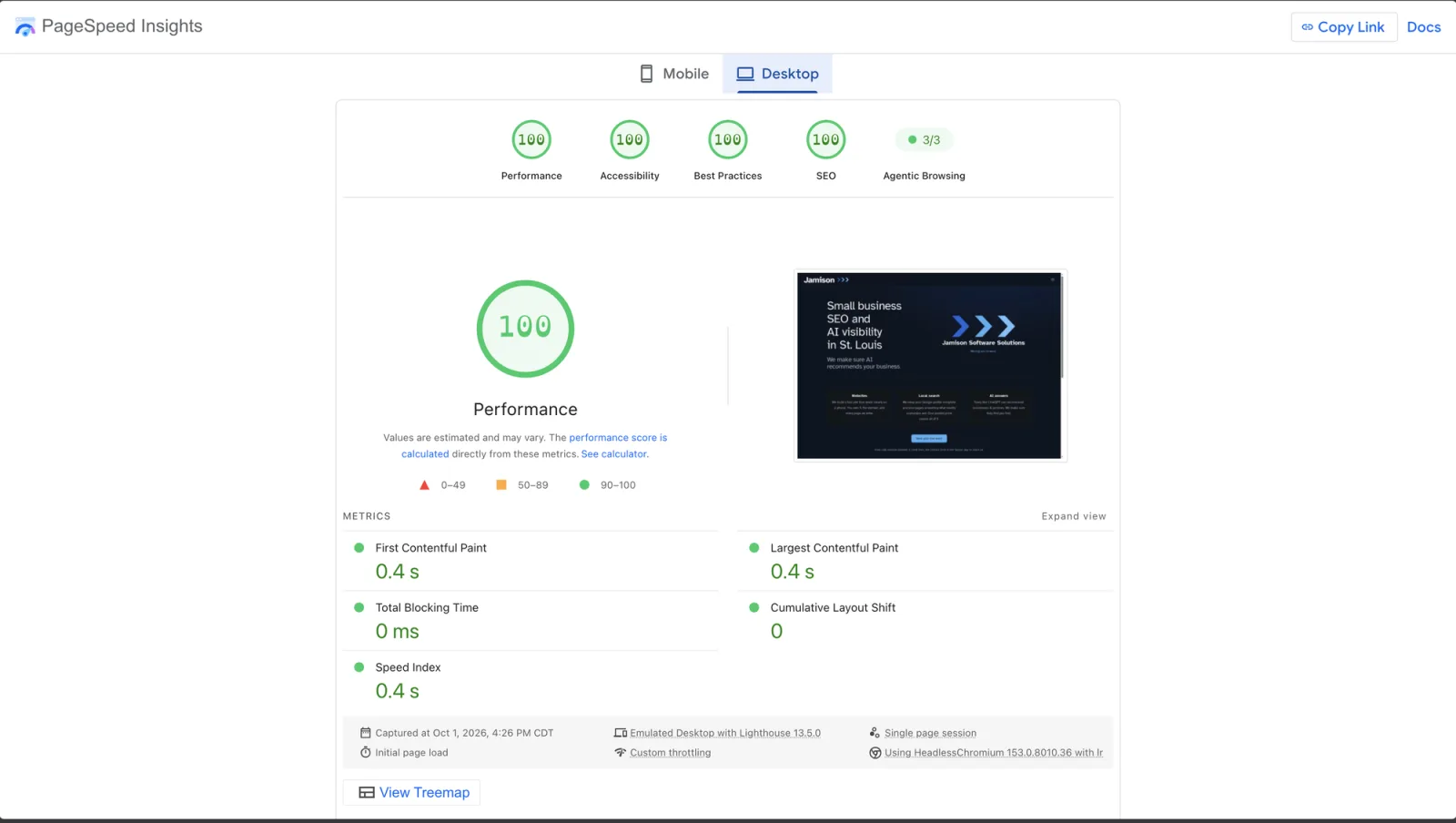
The same page on the Desktop tab, captured Oct 1. Screenshot: Jamison Software Solutions.
Our desktop score reads 100, and the mobile run reads 97, with the page showing in 1.8 seconds, no layout shift, and no blocking time. I look at desktop second, since the parking-lot customer isn’t at a desk.
What’s left is whether a red tile is a quick change or a job for a developer.
When a slow score needs a developer
Under the lab section, PageSpeed Insights lists suggestions for how the page may be improved (Google), and that’s where I look for what’s slowing a red tile.
If it names one oversized photo at the top of your homepage, the change may be a smaller photo you can swap in yourself.
I’d hand a developer a red page-showing tile where the wait starts on the server: your host is slow to send the first piece of the page, before any photo or text can load.
That one lives in the hosting and code, and the question to bring is: which part of the phone wait is slow, and what does fixing that part cost next to the rebuild quote?
This week, run your homepage on the Mobile tab and write down the three tiles. Run it again on the first of each month, & a slowdown shows up in your notes before it shows up in your phone calls.
If you’d like a second set of eyes on your report, that’s a consultation: $125 for the hour, and you leave with the list whether or not you hire me afterward.
Bookings are unavailable before January 12, 2027. Inquiries are open.
I hope this helps.