
A Business Profile left alone for months starts to read stale, to Google and to the people searching for you. Twenty minutes a month keeps it alive: one post, one photo, one answered question, and one look at the Performance screen.
Why a finished profile still goes quiet
Setup day feels like the finish line. The hours are in, the photos are up, the description got rewritten three times, and then the shop gets busy and the profile sits.
That stillness has a cost. Google says customers are 70% more likely to visit a business with a complete Business Profile (Google).
Complete keeps moving, though. Hours shift for the holidays, a service gets added, a phone line changes, and Google notes that a profile with inaccurate information may not show up for relevant searches nearby (Google).
The one-time fix lives in my Business Profile audit post, and the Google Business Profile checklist covers what a finished profile holds. From what I’ve seen with local shops, the plainest sign someone still tends a profile is a fresh post.
Google Posts: what they are and how long they show
A post is a short note from the owner that shows on the profile. Google offers three kinds: Updates, Offers, and Events (Google). The Update is the everyday one, and it can carry a description, a photo or video, and a button with a link (Google).
On a computer, posts show in the “From the owner” section; on a phone, under the Updates or Overview tabs, on both Search and Maps (Google).
Google archives posts older than 6 months unless a date range is set (Google), so the post from setup day has a shelf life.
Google also reviews each post, marking it Live, Pending, or Not approved, and only Live posts appear on Search and Maps (Google). Check the next day to see which one you got.
I’d post one Update a month about something true right now: a seasonal job, new hours, a project you just finished.
Most Updates carry a picture, the second piece of the routine.
One new photo a month, and the sizes that fit
That picture is worth taking yourself. Owners and customers can both upload photos to a Business Profile (Google), so the gallery fills with or without you. A monthly photo of your own keeps your view in the mix.
The sizes are forgiving. Google’s guidelines ask for JPG or PNG files between 10 KB and 5 MB (Google), with a recommended 720 by 720 pixels and a minimum of 250 by 250 (Google).
The cover photo has a catch. Setting one doesn’t guarantee it shows first, and if Google judges it low-quality, a customer’s photo may be picked instead (Google). Your own good photos give Google a better choice.
New uploads can take 24 to 48 hours to appear (Google), so check back after a couple of days.
I’d shoot the work itself: a finished job, the counter on a busy Saturday, the truck outside a house in Kirkwood (with the owner’s okay).
Photos show what the place looks like. They can’t answer the question customers keep asking.
Answer one question on the profile each month
From what I’ve seen, a shop has one question it answers on the phone week after week. Do you take walk-ins? Do you come out to Chesterfield? What does a basic visit cost?
That question belongs on the profile, answered in plain words, so the next person has it before they call.
Some profiles show a questions area where people ask and you reply; what Google shows varies by business, so open yours on your phone and look.
An unanswered question sits in public under your business name, the way an unanswered review does. Replying is the habit I walked through in how to get more Google reviews: a short, kind answer shows the next reader there’s a person here.
Once a month, write down the question you heard most. Answer it in two or three sentences, the way you’d say it at the counter, & put it on the profile: in the questions area if yours has one, or as that month’s Update.
The last few minutes go to the Performance screen, to see what moved.
Read the Performance screen once a month
Google describes relevance as how well a Business Profile matches what someone is searching for (Google), and the Performance screen shows you those searches. Its Searches metric lists the terms people used to find the business, updated at the start of each month, and it can take up to 5 days to show up (Google).
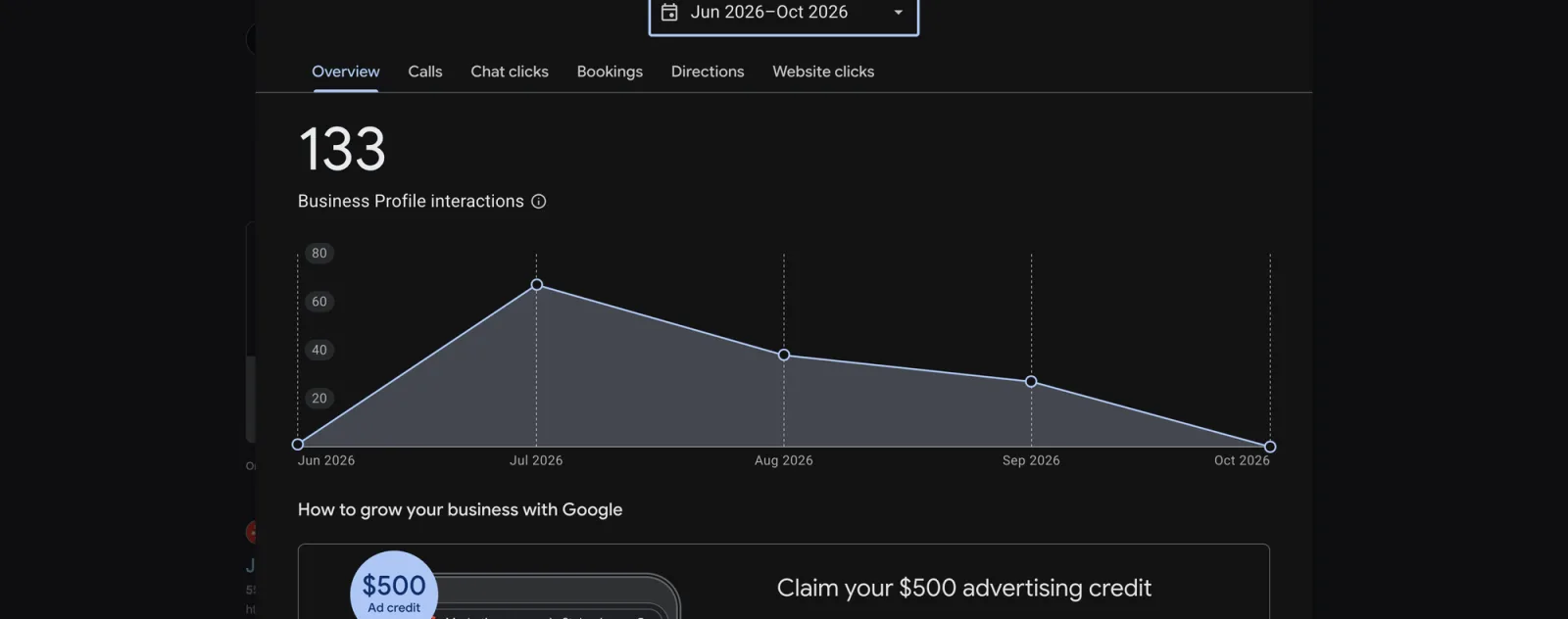
The Performance overview for my own profile, June to October: 133 interactions, peaking in July and easing through September. Screenshot: Jamison Software Solutions.
Beside it sit the plain counts: calls from the call button, clicks on your website link, and requests for directions (Google).
A date range shows how the profile did over time (Google), so put this month next to last and look for one change.
I’d watch the search terms first. If people find you by “furnace repair Webster Groves” and your last post talked about air conditioning, next month’s post and photo just found their subject.
The kit’s monthly page puts the same twenty minutes on one printable sheet.
Today, open your calendar and set a twenty-minute reminder for the first Monday of next month. Start with the post.
I hope this helps.